

Android Reintroduces Navigation Buttons on Google Books in an Unexpected Format

Reviving Physical Navigation: Googlebooks Welcomes Back Iconic Android Buttons
The latest iteration of Googlebooks has sparked discussions in the tech community, particularly regarding its keyboard layout. A common misconception is that the Quick Insert and Google logo keys are recent innovations. In reality, these features were first introduced on certain Chromebooks a few years ago. However, this new version has brought back familiar elements from earlier Android devices.
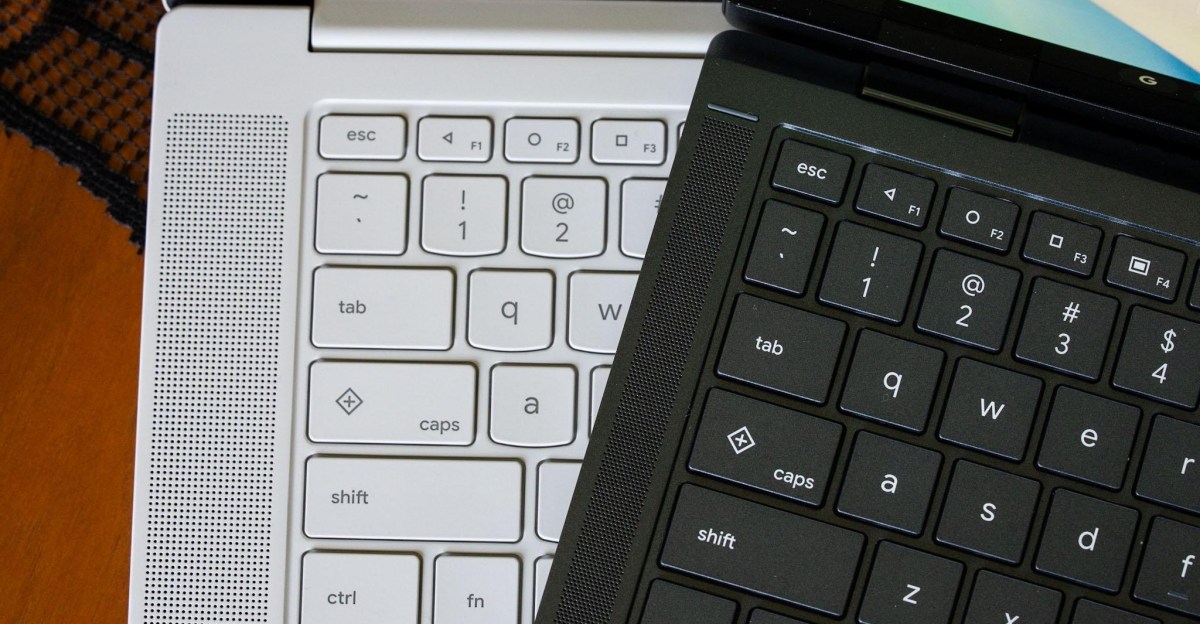
Notably, the F1, F2, and F3 keys on each Googlebook keyboard now feature the classic triangle, circle, and square navigation icons, reminiscent of those that debuted with Android 5.0 Lollipop. These symbols represented essential functions like back, home, and app switching long before the shift toward gesture-based navigation. Even today, they remain available on devices running Android 17 as an alternative to current navigation methods.
On the Googlebook OS, the functionality of these keys is intuitive: the triangle navigates back, the circle minimizes all open apps to return to the home screen, and the square displays all active applications, similar to Mission Control on macOS and Task View on Windows.
The inclusion of these navigation buttons proves beneficial, particularly when managing Android applications that may not be fully optimized for desktop environments or mouse interactions. While a simple double press of the home key would ideally restore all apps to their previous state, this action is instead handled by a separate feature known as desktop peeking, which requires a different keyboard shortcut.
For long-time fans of Android, observing the return of these buttons is a nostalgic experience. They also serve as a reminder that having reliable navigation tools can be crucial, especially when applications may not function seamlessly in a desktop setting.
Editor’s Take
The revival of physical navigation buttons on Googlebooks underscores a noteworthy trend: the need for reliable user interface options in a world increasingly dominated by gestures. This development could enhance user experience, particularly for those who favor tactile feedback. For businesses and developers, it reflects an understanding of diverse user needs, potentially guiding future app designs toward improved functionality on desktop interfaces.
Source: www.theverge.com