

Windows 11 Introduces Enhanced Shortcuts for Xbox Gaming Mode and Search Features

Windows 11 has recently unveiled its latest Insider build, introducing an array of enhanced search functionalities and streamlined quick settings, particularly for users in Xbox mode. This update allows gamers to manage essential settings—such as Bluetooth, WiFi, and power options—without having to exit their gaming sessions, significantly enhancing user experience.
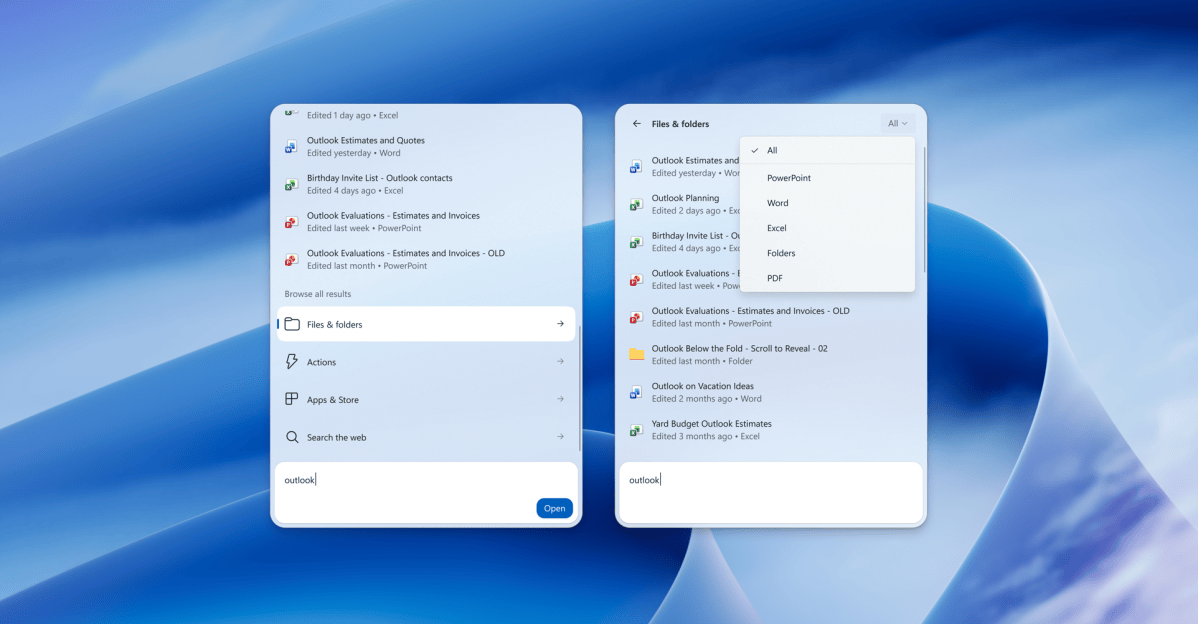
The new search improvements are notably extensive. Users can now filter their search results across files, actions, and web content. Additionally, the integrated search bar enables users to perform various tasks, including adjusting screen brightness and volume. For those with connected devices, actions such as making phone calls are now conveniently manageable through this interface. Results are also enriched with details—providing information like the last modification date of files and their authors—and can display relevant data such as stock charts and weather forecasts. Users can even refine their search experience by providing feedback via thumbs-up or thumbs-down options, allowing Windows 11 to learn and improve over time.
To explore the complete list of changes, interested users can refer to Microsoft’s blog. Both Beta Build 26220.9836 and Experimental Build 26340.9843 are currently accessible to members of the Windows Insider program.
Editor’s Take
This development is a significant step forward for Windows 11, especially for users who engage heavily in gaming. The ability to manage settings seamlessly during gameplay is likely to enhance the overall user experience. Moreover, these improvements in search functionality underscore a movement toward more intuitive interactions with operating systems, paving the way for greater efficiency for both individual and business users.
Source: www.theverge.com